Friday, June 27, 2008
Read This Before You Fly
A generous soul on LM-Net posted this very useful link that lists, by airline, all the different fees being charged. Since it's the season for conferences, well worth a perusal. Good to know you'll be charged $3.00 for that can of Diet Pepsi!


Thursday, June 26, 2008
I Lied...
OK, so I have one more pre-NECC post!
I just downloaded Firefox 3, and have been playing with it for the last hour. Wow, I love it!
1. It has the smoothest scrolling I've ever seen on a browser.
2. It has a great new way to bookmark, that even inspired me to FINALLY organize my bookmarks.
3. It lets you alphabetize (and tag!!) your bookmarks. I've been waiting for that one. It seems like such a no-brainer.
It does other cool stuff that I haven't had a chance to test yet, but you can see for yourself here. So far, it's been a trouble-free upgrade.
I just downloaded Firefox 3, and have been playing with it for the last hour. Wow, I love it!
1. It has the smoothest scrolling I've ever seen on a browser.
2. It has a great new way to bookmark, that even inspired me to FINALLY organize my bookmarks.
3. It lets you alphabetize (and tag!!) your bookmarks. I've been waiting for that one. It seems like such a no-brainer.
It does other cool stuff that I haven't had a chance to test yet, but you can see for yourself here. So far, it's been a trouble-free upgrade.
Your Tax Dollars at Work (at last, something to show for it...)
I attended a workshop today on searching government sites. (Only a librarian...) The workshop was o.k; but check out these great sites I ran across while being sidetracked.
ToxTown: Explore these virtual eco-horror sites courtesy the National Library of Medicine. Choose among City, Town, Port and other neighborhoods, then explore the chemical and health concerns inherent in each.
EPA Student Center: I wish I'd known about this site when the 8th graders were researching for the Science Fair. More than the usual environmental info, the site's "In Your Neighborhood" link allows students to research the environmental stats where they live.
National Archives Digital Vault: New to the archives, this site offers a new Flash interface, where you can choose a collection or shuffle to be surprised. A "Collect" button allows you to drag items to create your own collection, then use your items to create a "Pathways" challenge with clues to solve, a poster or a Ken Burns-style movie, all right on the site.

Next blog will come from NECC! I can't wait!
ToxTown: Explore these virtual eco-horror sites courtesy the National Library of Medicine. Choose among City, Town, Port and other neighborhoods, then explore the chemical and health concerns inherent in each.

EPA Student Center: I wish I'd known about this site when the 8th graders were researching for the Science Fair. More than the usual environmental info, the site's "In Your Neighborhood" link allows students to research the environmental stats where they live.
National Archives Digital Vault: New to the archives, this site offers a new Flash interface, where you can choose a collection or shuffle to be surprised. A "Collect" button allows you to drag items to create your own collection, then use your items to create a "Pathways" challenge with clues to solve, a poster or a Ken Burns-style movie, all right on the site.

Next blog will come from NECC! I can't wait!
Tuesday, June 24, 2008
All-In-One Research Organizer
Have you discovered Zotero, yet? It's billed as a "personal research assistant," created by the folks at George Mason University and funded by both the Andrew Mellon Foundation and the U.S. Institute of Museum and Library Services. And it's free.
A Foxfire add-on, Zotero helps researchers gather and organize resources, take notes, cite sources in more styles than I've even heard of, create bibliographies and share results. Students can save websites, highlight add sticky notes, created note cards--it's great! It even works with many databases, such as JSTOR.
I was thinking of subscribing to NoodleTools for the school next year and using it with Diigo, until one of our tech guys sent me the Zotero link. Now, I plan to make Zotero's installation and basic training part of Day One for all research projects.
The Zotero site also includes several good tutorials on both a basic and advanced level.
Definitely worth checking out!
A Foxfire add-on, Zotero helps researchers gather and organize resources, take notes, cite sources in more styles than I've even heard of, create bibliographies and share results. Students
 can save websites, highlight add sticky notes, created note cards--it's great! It even works with many databases, such as JSTOR.
I was thinking of subscribing to NoodleTools for the school next year and using it with Diigo, until one of our tech guys sent me the Zotero link. Now, I plan to make Zotero's installation and basic training part of Day One for all research projects.
The Zotero site also includes several good tutorials on both a basic and advanced level.
Definitely worth checking out!
Thursday, June 19, 2008
Email Triage
My school email inbox currently 1,756 emails. My .Mac inbox struggles along with 1,756while my Gmail account groans under the load of over 4300 emails. I fear that email catastrophe looms, and certainly the crowding adds to the difficulties even my supposedly "expert" search attemps undergo when I try to find an email more than a week or two 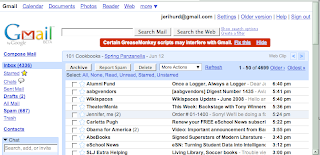 old.
old.
I suspect I'm not the only one...
An article by Joe Kissell in this month's Macworld (Empty Your Inbox) gave some interesting suggestions for controlling the chaos , one of which I plan to instigate immediately. Basically, he recommends performing email triage, by deciding whether emails need surgery, can hang around in the waiting room for a while or should be sent immediately to the morgue!
In your email account, create three folders titled "Filed," "Action," and "Later" (this doesn't work with Gmail, by the way, which doesn't allow you to create folders. But try these alternative methods.)
Now start reading your email! If you can respond quickly, do so and file the original email in the "Filed" folder. Better yet, if you don't need a record of it, send it to the Trash!
Should an email demand more of a response than you have time for at that moment, drag it to the "Action" folder. This will be your priority file and should be checked regularly. When you've dealt with on of the messages, move it into 'Filed."
Use the "Later" folder for anything you may want to spend time on later, but there's no rush. Peruse it as you have free time, and file or trash them as necessary.
Time to start clearing my inbox. Wish I'd known about this several thousand emails ago....
 old.
old.I suspect I'm not the only one...
An article by Joe Kissell in this month's Macworld (Empty Your Inbox) gave some interesting suggestions for controlling the chaos , one of which I plan to instigate immediately. Basically, he recommends performing email triage, by deciding whether emails need surgery, can hang around in the waiting room for a while or should be sent immediately to the morgue!
In your email account, create three folders titled "Filed," "Action," and "Later" (this doesn't work with Gmail, by the way, which doesn't allow you to create folders. But try these alternative methods.)
Now start reading your email! If you can respond quickly, do so and file the original email in the "Filed" folder. Better yet, if you don't need a record of it, send it to the Trash!
Should an email demand more of a response than you have time for at that moment, drag it to the "Action" folder. This will be your priority file and should be checked regularly. When you've dealt with on of the messages, move it into 'Filed."
Use the "Later" folder for anything you may want to spend time on later, but there's no rush. Peruse it as you have free time, and file or trash them as necessary.
Time to start clearing my inbox. Wish I'd known about this several thousand emails ago....
Wednesday, June 11, 2008
Designing Your Library Website
My biggest project this summer--aside from tagging all the books for the new security system!--is redesigning the library website. The current version is OK, but desperately out of date and not very fun. I want something with a more jazzy look, more interactive, and definitely more educational!
So I've been digging online and reading, trying to find ideas for what I want. I've found some pretty good resources, and thought I'd share them for anyone else wanting to work on their site.
Pam Berger's InfoSearcher blog gives a good description of the two phases involved in building a library website.
Linda Bertland's Resources for School Librarians page provides a plethora of library website links. Be sure to look at Joyce Valenza's webquest page for a nice collection of best practice sites.
Best Practices in School Library Website Design Article from UNC.
Creating a School Library Website Learning module by Rosemary Horton.
I think I'll use iWeb to create the pages, rather than Dreamweaver, as originally planned. It's just so much easier, especially for including blogs and podcasts of the video tutorials I want to do.
I'll blog more about this later, when I'm further along the process.
So I've been digging online and reading, trying to find ideas for what I want. I've found some pretty good resources, and thought I'd share them for anyone else wanting to work on their site.
Pam Berger's InfoSearcher blog gives a good description of the two phases involved in building a library website.
Linda Bertland's Resources for School Librarians page provides a plethora of library website links. Be sure to look at Joyce Valenza's webquest page for a nice collection of best practice sites.
Best Practices in School Library Website Design Article from UNC.
Creating a School Library Website Learning module by Rosemary Horton.
I think I'll use iWeb to create the pages, rather than Dreamweaver, as originally planned. It's just so much easier, especially for including blogs and podcasts of the video tutorials I want to do.
I'll blog more about this later, when I'm further along the process.
Monday, June 9, 2008
For Frustration, Dial '1'
I was having huge problems with my DSL last year. Yet everytime I tried to call Verizon, they sent me through what surely must be Dante's 10th level of hell: "For customer service, press 1; for sales, press 2" in a never-ending circle of obstacles designed to ensure you don't actually speak to a live person. After several days and one particularly grueling 45 minute button session, I finally blew and pressed "3" to cancel my service. Voila! A person! Who actually immediately put me in touch with another person who was able to solve my problem. Amazing how threatening to cancel can work miracles
There's gotta be a better way. And, according to the Feb. 25th Newsweek (I'm a bit behind in my reading...), there is.
The website gethuman.com provides the secret code for a plethora of companies that will actually hook you up with a live person far more quickly. An A-Z listing allows you to search for your company by name, then tells you what magic combination of button pushing will bring an honest-to-gosh human being onto the line.
You may never have to listen to "hold" muzak again!
There's gotta be a better way. And, according to the Feb. 25th Newsweek (I'm a bit behind in my reading...), there is.
The website gethuman.com provides the secret code for a plethora of companies that will actually hook you up with a live person far more quickly. An A-Z listing allows you to search for your company by name, then tells you what magic combination of button pushing will bring an honest-to-gosh human being onto the line.
You may never have to listen to "hold" muzak again!
Subscribe to:
Posts (Atom)